¶ Configuring Turbo and Smartcast
This guide covers the Turbo Config tool included with the HymnRO Launcher, which lets you set up global toggle hotkeys and per-key Turbo/Smartcast behavior.
What's the difference?
- Smartcast - casts a skill immediately on your cursor/target with one click, instead of requiring a second confirmation click.
- Turbo - shortens the visual cast/attack animation on your screen. It doesn't change actual server-side cast time or delay, just how fast the animation looks.
You can use either, both, or neither - they're independent settings.
Contents
¶ Opening the Tool
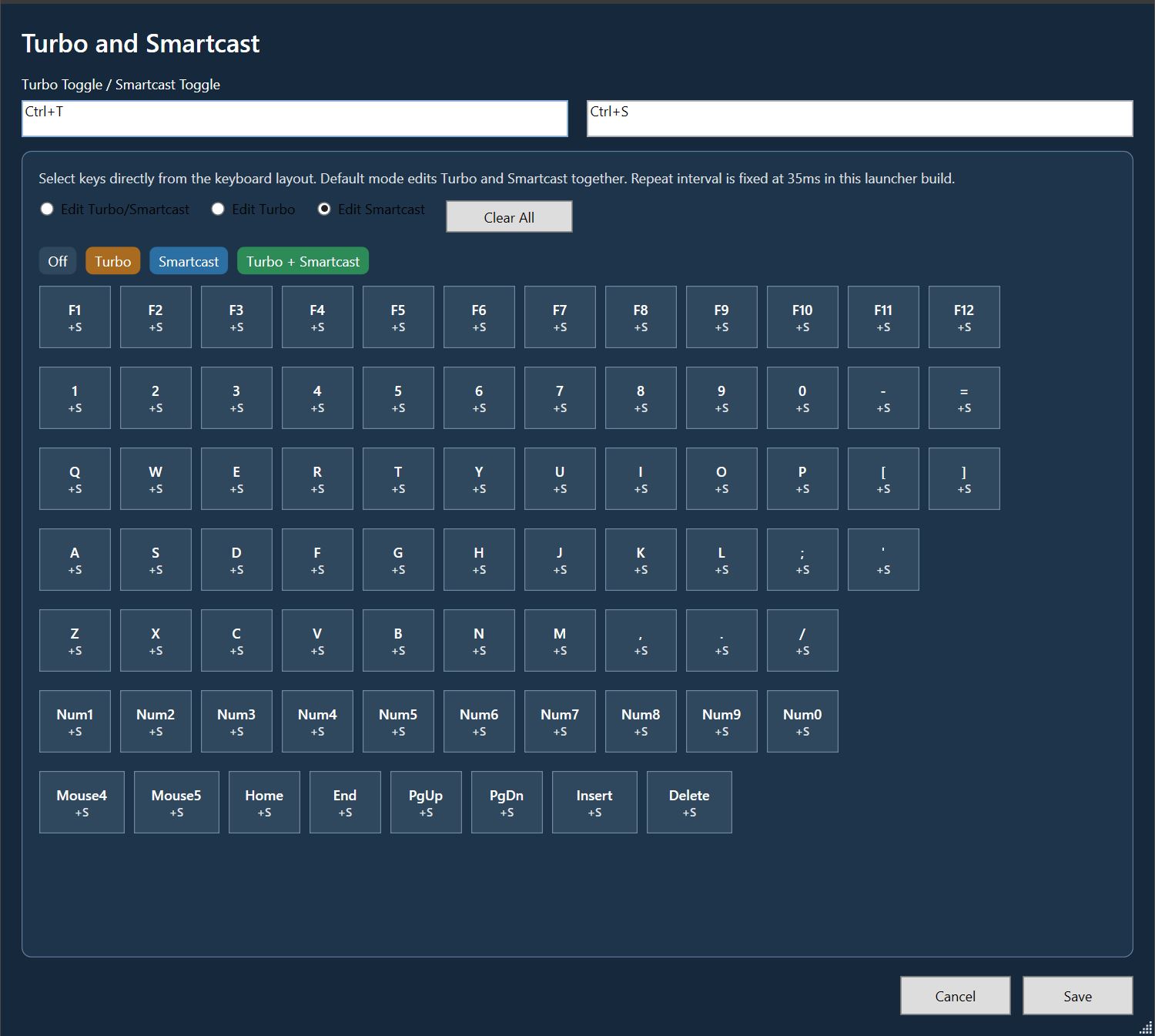
Launch Turbo Config from the launcher. You'll see a keyboard layout where every key can be individually assigned a mode.
¶ Global Toggle Hotkeys
At the top of the window are two fields:
| Field | Default | Purpose |
|---|---|---|
| Turbo Toggle | Ctrl+T |
Toggles Turbo on/off globally |
| Smartcast Toggle | Ctrl+S |
Toggles Smartcast on/off globally |
Click into either field and press your desired key combo to rebind it.
¶ Edit Modes
Below the toggle fields, choose which mode you're editing with the radio buttons:
- Edit Turbo/Smartcast - edits both settings together on the keyboard grid
- Edit Turbo - edits only Turbo assignments
- Edit Smartcast - edits only Smartcast assignments
¶ Assigning Keys
With an edit mode selected, pick a color from the row of buttons, then click keys on the grid to apply that setting to them:
| Button | Color | Effect |
|---|---|---|
| Off | Gray | Removes Turbo/Smartcast from that key |
| Turbo | Orange | Enables Turbo only |
| Smartcast | Blue | Enables Smartcast only |
| Turbo + Smartcast | Green | Enables both |
Click your selected color, then click each key you want it applied to. The key will update to show a +S (or similar) tag confirming the assignment. You can click through the full keyboard grid - including F-keys, number row, letters, numpad, and extras like Mouse4, Mouse5, Home, End, PgUp, PgDn, Insert, and Delete - to build your full skill hotkey layout.
If you use a specific set of skill hotkeys, only assign Turbo/Smartcast to those keys rather than the whole keyboard - it keeps things predictable and avoids accidentally affecting keys you use for chat or movement.
¶ Clearing Assignments
Click Clear All to reset every key on the grid back to Off. This does not clear your toggle hotkeys at the top - only the per-key Turbo/Smartcast assignments.
¶ Saving
Once your layout looks right, click Save to apply it. Cancel discards any changes made in this session and closes the tool.
Changes only take effect after saving. If you close the window without saving, your edits are lost.